Posts Tagged ‘#keyboard’

This is another term that is often misunderstood and the results can be unpleasant for the audience and performers as well.  This does not prevent the error from happening over and over.  It doesn’t have to happen to you.  At first glance the term is quite simple.  In its simplest form it probably means “turn things louder”.  And that may be the most widely used interpretation.  But the phrase is not, ‘Sound Forcement‘…… it is reinforcement.  If something is loud enough on stage, ……… wait for it ………. It DOES NOT need sound reinforcement.  In a small room, the trumpet probably doesn’t need much – if any – volume reinforcement.  (certainly not in the stage monitors and little if any in the house mix)  The guitar player with 10 Marshall stacks in a thirty seat room probably does not need sound reinforcement.   Well then, what does?

Simply enough, anything that is not run directly through an instrument amplifier on stage.  This could be the sounds from the keyboards or tone devices, vocalists, special effects FX (usually effects are used in the house mix but can also be sent to the monitor sends) and back ground or other media tracks including the ‘tape’ input for your stereo music player used in our earlier post. 

We will do better if we use this definition for both sound systems we have pulled together for this event.  On stage, do not add anything to the monitor mix that is already loud on stage.  Again there are exceptions and many performers will argue this point, but I try to keep the monitor sends clear of anything I do not need to reinforce.  If it is a big stage and members are far apart – absolutely add a little of an instrument to the other monitor mix.  Everyone needs to hear the other performers.  Just do not add to all monitor mixes if you use multi-monitor sends.  Smaller stages there is little advantage in sending amplified instruments or drum set channels to the monitor mix.

Now, look at the balance from the house point of view. Can you hear the reverb on the snare drum and mounted toms clearly?  Is one vocalist drowning out the others?  Is that trumpet (or cymbal crash or tambourine or Kick drum) not in the mix during the solo?  Can the keyboard player hear the monitors or instrument amp really good but no one in the audience can hear them?  Can solo performances be heard clearly above the mix?

Set and forget.  There are a number of input sources you will be able to set once and leave alone.  The drums should be set up properly during sound check and should not need fader, pan, EQ or volume adjustments during the typical event performance.  So the easy ones are drum and percussion kits along with some keyboards and other tone generators.  Brass, string or choir sections can also be set.  Most of these groups can be balanced during sound check and you will never have to mess with them for the rest of the performance.  That allows you to focus on the variations of vocal performers, solo instruments and ‘guest’ players.  Make sure if you turn the instrument louder during a solo or energy section that you turn it back down when the section is over. Otherwise it is a race to the top and others will need to turn up to hear themselves comfortably.  Then the rest of the group has to do the same to keep up with the neighbors on stage.  It can get ugly at the top.

In small clubs or rooms, there is very little need for large PA systems and huge speakers.  In many situations you will do fine to let the stage volume fill most of the room.  Sometimes all I have to add is the keyboards and vocals, with the effects thrown in on top.  I might bring up a guitar or other solo instrument in the mix, when the rest of the time that instrument fader is off completely in the house and monitor mix.  It simply does not need sound reinforcement there.

In some gigs, a player can be loud enough on stage that you cannot increase over-all volume using the house system.  They are so loud that the PA for a small club will have little effect.  I have been known to take players completely out of the house mix.

I use simple guidelines and want to ensure that any and all performers will be heard in the house.  This includes each percussion instrument to various keyboard textures and sounds.  I keep all levels in balance so one instrument or group of instruments does not dominate the performance or mix.  I make sure band members know they do not have to play loud on stage.  All they have to do is play good and I will make it sound great in the house. You play; let me crank it up!
Through these posts, I am not trying to cement chronological events into their proper place in time or to accurately credit performers and contributors.  Some names will be changed to protect the stupid and I will name names with regards to privacy as the series continues.  I am not drilling down to details as I share experiences, songs or events I have been involved in.

Many comments touch on sharing similar passions and the need to stare resistance in the eyes and push past it to practice, perform, write and blog.  No matter where we are on the paths we have chosen, we can positively affect those around us.  We can benefit from their experience as  we grow from our own.  It is the big picture that is difficult to see sometimes, and I hope to bring up topics that will help add a different perspective.

There are a lot of conversations to be had in our world.  So much of sound reinforcement, songwriting, live performance and related arts appears to be magic to the casual observer.  On the other hand, so much of it is science and that can scare off a lot of interested people.  Thank goodness there are those like you out there that can shape the form out of chaos!  You are the masters that can combine the art and the science and make it breathe on its own.  You have a special way to communicate….. to others, yes; but more importantly to yourself.

One area I hear a number of discussions where people have a good feel for music, but do not understand the science or the art of it is in music theory.  More on this in later posts and I will have a few friends chime in as well as we discuss scary topics like, scales, key, modals and rhythm.  But to start this off at an easy pace think of this;  in our (Western scales) there are only twelve notes to deal with!

Our Bodies Move aka FOR THOSE WHO WAIT”    (c) 12/1987


          Lyrics Michael Kennedy


Music by Ric Ahlers


So many people look for love and affection

Think they’re heading in the right direction.

They go searching through the heat of the night

Alone again in the morning light.


I’ve seen a lot of selfish devotion

Hopelessly lost in mixed up emotion.

Opening; then closing every door

Never know what they’re looking for.


CHORUS:    I’ve never felt a woman feel this good before.

I’ve never listened to her whispers

Or knock upon the door.

Nothing to hide, nothing to prove,

Its love that makes our bodies move.


In the beginning there were many pretenders

Holding on ‘til everyone surrenders.

Strangling the love they create.

Love is For Those Who Wait.


CHORUS:    I’ve never felt a man feel this good before.

I’ve never listened to his whispers

Or knock upon the door.

Nothing to hide, nothing to prove,

Its love that makes our bodies move.


You have seen a million and one videos of live bands or performers.  The stage set-up is fairly common for most band configurations.  We usually do it like they do because it almost always works.  If you have a typical band or act, use the standard stage set up to start with and correct if you need to make adjustments.  Some band or act members will play instruments, some will sing or do both, some will jump off stage and some will be too drunk to walk on their own.  Keep your eyes open and stay close to the volume fader!

I usually turn the volume down on the main amp and the monitor amps before the band starts arriving on stage.  Always make sure to turn the main and monitor volume faders down completely before connecting OR disconnecting  any cables to the mixer or snake.  The snake should already be connected in numerical order before the band is there as it is needed to set up the monitor signals we tested in the last LSR series. 

I know a lot of sound guys that do not do the following suggestion or piece of advice I will give you.  But if you are just starting to do LSR or have been doing for a while and sound checks are not fun and people get angry (with you sound gal and band/act), fire up the sound system this way.

Connect all cables to the snake in an orderly system.  You can use your own rules as needed by the performers or the event to number them, but try to use a system that is easy to remember and easy to repeat,  I will have some suggestions and tips coming in future posts.

Usually, performers will show up at different times.  I try to take advantage of that and direct them to the proper position on stage.  Connect their instruments and microphones to the snake.   Connections can be made simple too as you will see in other topics.  Test their signals from the sound board and make sure to get good working levels (NOT practice levels!)  (More on ‘Gain Staging’ in future posts)  Listen through headphones if necessary to get a good tone and strong signal.  Add player to monitor send(s) as needed.  Now you can talk to performers and have them help you get their levels set.  As each player arrives, the other players will encourage same process;  get into position, plug in instruments, check levels, if applicable add signal to the monitor mix(s) as needed. 

I do all this without turning the Mains volume faders up at all.  For the most part, the audience (and the host that represents the people that paid you and your group for the event!) will not hear much at all, especially as the venue or room for the vent gets larger.  The sound check stage volume should not be enough to bother most people in a club or hall unless they are very close to the front of stage.  After testing each performer’s input signals and getting a good monitor mix, it is time to have the performers do a song or section of the performance that has all members if possible playing.  Do a song or two without the mains turned on to get the feeling of the sound on stage.  Do not rely on the house speakers for this part.  Check with your headphones.  Solo ‘channels‘.  Adjust the monitor mix for each player as needed……..  This is an art of its own and has a bit of science and magic thrown in.

At that point I am ready.  I have good signals, I have tested the Mains and they work as designed and sound good.  The monitor levels are right and during the sound check the performers and players settled in and all players could hear themselves and other performers in proper balance.  If you are lucky, it is time for you and the band to take a break and get ready for the performance and the energetic crowds.  If desired or requested, you can play audio or sound tracks during break through the house system (never the monitors unless specific need) at a moderate level to set the mood.

As the Live Sound Reinforcement Series (LSR) continues, I would like to share some of the events that allowed or inspired what I refer to as captured creativity.  Let’s address a couple things now; the most amazing show/event with powerful and talented performers has little meaning if no one is in the audience.  The performers will feel great and energized, but if there literally is no audience (even in the form of recordings),  it will be lost.  The other obvious reality check is no matter how talented and smart you are – or think you are – will NOT make you loved and famous.  Touching on my daughter’s gracious note to me, some of the most talented musicians out there we will never hear.  You will not find them in a search and no one will point you in their direction.   But they just keep on creating.  Soloists, artists, groups and garage bands.

I know that thrill.  I understand the communication link that HAS to happen when you perform with someone.  I first got that thrill in my preteens when I put some of my brother’s poetry to music.  In truth, I exaggerate; I played on bongos and sang a rough melody line with his poetry still intact for the most part.  I would get another type of thrill when I began to write lyrics and finally a bunch of ideas became a song. 

We also knew right away that I was not the best singer out there.  I never really excelled while playing various instruments but over the years I got pretty good at a few of them.   But at least I was a songwriter and I knew I had a powerful tool.   I love to teach by sharing.  Or is it the other way around?

It all started with my dad. I grew up with a recording studio right below my bedroom. He produced and recorded hundreds of original songs at home. The whole family got involved. We sang on tracks and gave our input, but mostly we just supported him, which encouraged him to keep producing music. I learned how to use his equipment, how to play the instruments, how to run sound, which eventually lead me to start my own booking agency to help unsigned bands/artists release albums, go on tour and have their music heard by as many people as possible.
I hate that it all comes down to money. I hear shitty bands being played on the radio every day, but these amazing bands are struggling to gain fans one at a time, go on tour with very little money, stay in shitty hotels, and do it all for the love of their passion. In my dad’s case, he barely had that chance. He put his music career on hold to raise a family. I wish I could give him back the time he lost. I look at him now, years later, still in the studio, still making music and struggling to have that music heard. All he wants is to share his art with others.
I’ve never really stopped to tell him how amazing and unique his music is and how much it has truly changed my life. It isn’t about the money, popularity or fame, it is about connecting with others, reaching people with his words and being able to do something that he is passionate about. If you have someone in your life like this, please take a moment to stop and tell them how you feel. Thank them for inspiring you, support them, and don’t let them give up. The worst feeling in the world is that you are fighting for something alone. Dad, this is for you. I love you and I will always believe in you.

Now that you have the gear you need (or more likely what you could get your hands on), we can assemble it as we carry the gear in.  Do not carry this heavy and bulky stuff anymore than you have to – bring it in and put it where it goes.  So, as mentioned in earlier in this series, scope out the venue so you have a plan of attack.  Even if it is 15 minutes after you arrive, take a quick look around…. Where is the best place for the sound board?  How is the best way to run the long snake cable?  Where are the electrical outlets… can they handle our system power requirements?  Are there any doors or emergency exits you need to be aware of?  Where will the audience be?  Where should you set up the drums, keyboards and monitors?  Sometimes you will not have any choice at all and the host of the event will have their own layout.  Roll with it.

I try to get the main system and all cables run before the band gets there.  I have monitors in-place on stage based on my understanding of the performance/band/event.  I connect the mixer and all house cables. 

Then I test entire system;

Turn on mixer and plug in talk-back mic or any mic into a channel on the mixing board.  Make sure levels work.

Send Talk-Back signal to each of the affect inputs to make sure signal is going to proper effect box or internal effect, and make sure it returns to the input or ‘bus group‘ you will use for that effect.  Make sure headphones and ‘solo’ function works properly.  Yes………..   Bring your own headphones and (ear plugs too!) make sure they are good quality closed type.

Turn on stage monitor amplifiers.  Turn up each monitor send (can be one to four monitor sends from the board) and use Talk-Back mic to send signal to each monitor.  Turn all others off and listen to one at a time to make sure you are controlling the right monitor.  Do not overlook this step.  The on-stage mix is critical, and the mixer – sound engineer is not able to hear the speakers on stage once the mains or house speakers are kicking in.

Make sure all mixer sends to the main amps are turned off all the way before turning on the main amplifiers.  This can save you and the event host a lot of headaches.  Plug in an audio player to the mixing board ‘tape’ or other stereo input and set the levels.  (**)  Slowly turn up the mains with the audio source playing and the signal strength can be seen on the input indicator.  Give it some gas but no need to rattle the windows now.  Keep at a good level and make sure each speaker (or cluster/group) cabinet is connected properly and working.  Walk around the club/venue and listen to your test music.  Hopefully something you know very well.  Try to find areas where the sound collects in corners (sometimes the bass can build up in an area and become very boomy while the rest of the area you cannot hear the bass at all….) or where the sound ‘drops out’ and gets softer or thin sounding.  (this can be from improper phasing due to room acoustics or other audio timing issues.  Try slowly turning main speakers at different angles toward the audience to correct).  Make sure it sounds good everywhere, or at least know that particular areas will sound different and in a number of venues it will sound totally different as you walk around. 

It is not unusual for the sound board to be placed in the worst acoustic piece of real-estate in the club!  Make sure it sounds good standing in the audience, even if it does not sound so great where you are mixing the board.

Now, we are ready to bring in the band or performers.

20150215_173005Not only do we have 16 channels of MIDI available (per cable…. Other cables can carry 16 more channels as you expand) but we also have 128 steps or individual notes that can be assigned to each channel or voice.  (again, if your device counts zero as a number, you will have 0 – 127)  This is particularly important for triggers and non-sound system controllers.  For example, if you are playing a MIDI keyboard, sax or reed controller as Master, you are not normally trying to redirect a C# to an F, though there are reasons for doing this in some special circumstances.  You just want to perform your song on the Master Controller and have your performance represented as you played it – for better or worse!

However, for drum kits and other triggers it is crucial to set up in advance the sounds that will be played when a specific trigger is hit.  Usually you can change this in the Master Controller itself.  Pick the channel and the specific pad/key you are editing and go to the Menu Options page.   Select MIDI Note Number options.  There are too many ways today’s gear will get you there or what they call it so it is hard to make this specific to all, but that is what the owner manuals are for!  As your Master Controller is connected properly to the receiving tone generator or receiving device, hit the pad or key or button you are trying to edit.  You should be able to see the note number the current pad is assigned to.  Continue to raise or lower this number one digit at a time or enter the KNOWN MIDI Note Number and then Enter.  Once you are triggering the correct sound, sampler or other gear, go to the next pad in a similar mode until all assigned pads correctly trigger the intended receiver.  Save everything and pat yourself on the back!  Keep in mind you can do this over and over depending on project, recording or performance needs.  Most devices will allow you to store and recall a large number of performance templates or basic ‘kits’.  Take advantage of this tool!   Once you set them up, you can use them forever and make your set up time amazingly quick. 

As a keyboard player in a progressive rock band, I used specific keys or notes on my keyboard(s) that were outside the range of the cover or original tune we were playing and assigned them to trigger internal drum sounds like claps or cowbells, effects like record scratching and anything from applause to choir back-up notes.  I never used a sampler that would ‘play’ parts, I just added to the layers by using on-board sounds as a split keyboard arrangement or as real-time triggers to other devices. 

I used to play in the days when you had to have a different keyboard for each sound group you wanted.  If you wanted an electric piano, you played the Rhodes piano.


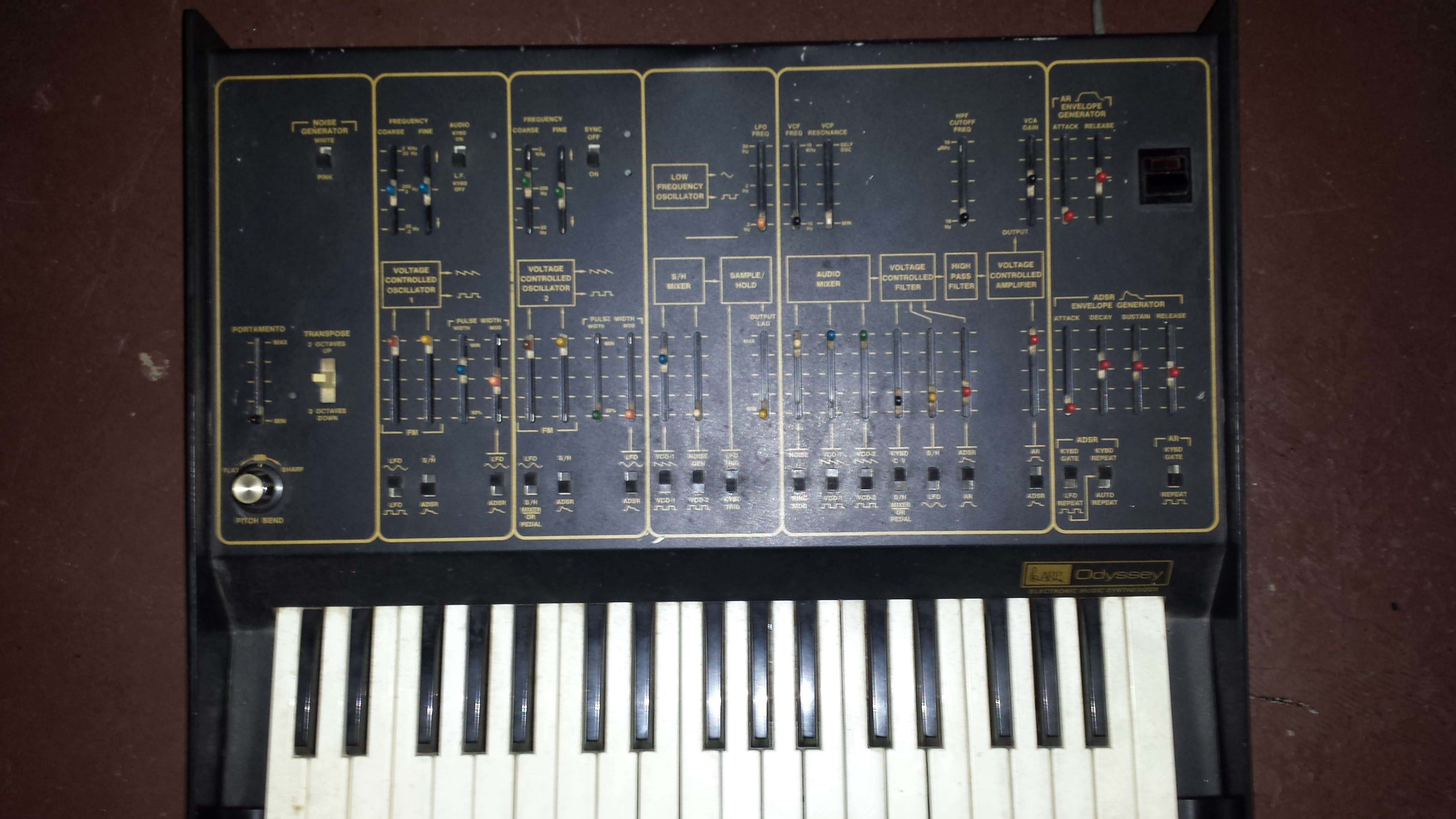
 20150215_172119 If you wanted an organ sound you carried around a Hammond or other organ.  If you wanted to use synthesizer sounds, you brought in a Moog or Arp and played two sounds at a time ……. and it felt glorious! 

Now you should have a comfortable of understanding – MIDI is a communication system between equipped devices.  This information allows us real-time control of receiving devices.  While there are a lot of basic on-off commends (actions) like note, sustain, start, stop, there are other commands that offer a range of control, typically 1 – 128 (or zero – 127).  Basic computer stuff, so we are stuck with a lot of groups dealing with 8, 16, 128.  You get used to it.  These continuous controller commands can be used to change how the receiving device or sound responds to the movement of the continuous controller. 

Here, I am not talking about the keyboard or sample trigger.  These are basically in-put hardware.  A few examples commonly found are modulation wheels, pitch bend wheels, joysticks, ribbons, foot controllers, and faders.  As mentioned earlier, you can send channel information to a number of receiving devices.  You can use the keyboard as you Master controller and assign one continuous controller to signal the light board to fade in or out and anywhere in-between.  In some set-ups you can use a sustain pedal connected to the Master Controller and when depressed, the light board receives the command (MIDI message) and the fog machine will be triggered.  Key pad triggers can be set up to do the same thing, but as you know, not every device is compatible with every other device, and sometimes features are left out from model to model.  But with most available manufacturer’s, you can easily accomplish versions of the above.

Performing in a duo band, my partner and I played guitars, I played keys, we both sang, he controlled a drum machine with bass pedals and I controlled a programmable drum machine.  As we did more popular dance style music, I would use the drum machine (sometimes when it was idle during a song and sometimes as another layer…) to sequence the synth-bass line of a cover tune.  Then I could play more keyboard parts live for a fuller sound.  As a songwriter, I have used this a bunch to create new audio landscapes and textures I probably would not have found on my own.  So try this if you have the necessary toys;

Take a drum machine or a MIDI drum pattern and play it over and over.  Now, change the sound of the MIDI receiving device or direct to another tone generator (yes!, for visual effects you can also do this to run lights if the sequence is done with the light board in mind).  But don’t just change to another drum or percussion patch.  Change it to a synth bass sound or orchestral strings – and keep changing.  Some sound settings you will not hear anything at all (probably because the drum notes are typically short in duration (and should be as we will get to later) and the sound has a slow attack and is not responding quickly enough to make the programmed tones audible.  (for this you can try holding down a sustain pedal if available and see how the sound responds to longer duration) I plan to go into the properties of ADSR in future series, so we will cover that in detail later.  Some sounds you will not hear every note from the drum pattern but as you listen to a wide variety of sounds, you will find this is OK. 

If needed, change the MIDI Note Number (oh, man, another topic!) from a crash or cowbell in the drum pattern and you can make it trigger another note that might be closer to the key or scale you are working in.  As you know, MIDI also provides real time control, so you can trigger other devices using this function during live performances and still keep it live.

Sound reinforcement can be broken up into simple segments and based on need of reinforcement project, we can narrow down the staggering options that can distract us.  Let’s dig in.

If you will only use pre-recorded music or audio tracks, this is relatively easy and you will get there quickly.  I will concentrate on the live performance for this series.  We will look at the needs of the band members, the requirements of the audio gear, understanding the environmental effects and the basic strategy to make it all work together.

Once you know the number of performers and the location of the event, you can begin planning on getting the gear you need and an idea of the requirements for great sounding – crowd pleasing live events.  The first step is to get an idea of the show/act/performance.  Live drums?  Keyboards or brass section?  Speech or information, you get the idea. 

Get an accurate count of the number of inputs you will need.  The total is important.  This can determine the size and capability of the mixer and the requirements of cabling, ‘monitors’, stands and microphones needed to cover the performance.  Then break them down into basic groups. 

Keep in mind that for making a live performance work, you need to have two totally independent sound systems available and in control so if we think about it, there is a sound system on the stage with the performers so they can hear themselves – and other performers – and any media they need to be aware of or perform with.  The audience requires the second system and this makes the party get started when the ‘house sound‘ gets cranked up and sounds great.

Most band /performer gear and audio cables will be connected to a long cable with a box at the end called a ‘snake‘.  Most inputs will be ‘mic‘ cables with three connectors for low ‘impedance‘ sources.  The microphone of your choice connects to a mic cable then gets plugged into this box on stage.  The snake connects that input to a very long cable leading up to the ‘mixing or sound board‘.  The sound board can listen separately to each input from the snake and can send that signal to a variety of ‘audio outs‘.  We will focus on the basic ones needed the vast majority of the time now and add more later on in this series.

The mixer – sound engineer will be able to send some of each performer’s input signal back through the snake to the amplifiers and their related on-stage speakers or in-ear monitors, etc.  (in this process it is really handy for the sound engineer to bring his/her own microphone….!!!!  That way once you turn on the stage monitors (on-stage speakers for performers) you can talk directly to anyone on stage and the main speakers going to the audience can be turned off so the audience will not hear you).  This allows you to quickly communicate to band members to help you sound check quickly.

The mixer – sound engineer will also send measured amounts of all performers’ inputs – all blended into a clear representation of the performance – to the main or house amplifiers and their related speakers/cabinets.  Effects like reverb and delay can be added to enhance the overall sound and ‘feel’ of the music/performance. 

That is the first goal.  Create two sound systems with the mixing board as the hub.  Operate them independently and you will be miles ahead of the rest of the ‘sound gurus’ I have heard out there.