Posts Tagged ‘#Yamaha’

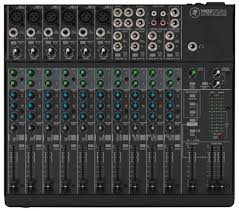
The sound board or audio mixer represents the hub in most audio mixing and mastering functions.  everything connects to the board.  Even the lighting system will use channels in the snake to connect from stage to console.  Things get plugged into and things get plugged out of the mixer as needed.  Today’s mixers are blue tooth USB WiFi fire-wired and light-piped together and will connect to an amazing array of devices.  So far we have focused on what gets plugged to the Inputs of the sound board.  There are a number of connection possibilities for the Outputs as well. We have already discussed some of them earlier, so this can be brief as you already know a lot of this in general.

On most sound boards you have a number of analog-out options.  In earlier discussions we talked about XLR and 1/4″ cables and connectors.  These will continue to be the main ones used for outputs.  On the front or face of most mixing boards you will see a stereo headphone out.  It will usually have its own volume knob and probably a selector to pick the options to Monitor including Stereo Out, Solo, Effects Sends, Effects Returns, Sub or Groups, Auxiliary Returns, and other options.  On the back or the top of the mixing board you will see the panel for Out-put connections in different sections.  There are some rules to determine what type of Audio Cable is used and whether it is a male end or female end and whether it has two connectors or three (or more).

In the early days of mixing boards, microphones and keyboards, it was important which brand you purchased.  If you wanted to get ‘that sound’ you had to have this mixing board channel strip or that particular keyboard.  Later on the computer industry similarly shot through their early days and you had the Macintosh or the Windows PC.  If you were brought up with one you could not be talked into the other.  Most modern equipment from PC’s to Automobiles can do everything.  They all have similar platforms and emulators.  There is style and quality as there always will be, but you can get software mixing programs and microphone/guitar emulator plugins that will make your audio tracks sound like anything you want —-THEY CAN EVEN MAKE YOU SOUND LIKE YOU ARE SINGING IN TUNE!!

So if you like Pepsi, no problem.  Want Coke?  Press this button……  More comfortable using a Mac?  Go for it.

All it takes is cash, a thorough understanding of what all the terms mean and a good idea where all the buttons are?!!?

Enjoy!

I am famous for doing things the easy way and if I can, as cheap as possible.  Now that does not mean forget quality and versatility.  It means I won’t spend money on gadgets that I don’t need.  I try to run as clean a mix as possible, and making sure everyone gets heard.  If they are up there ‘playin it‘, I want the audience to hear it.  In reality, it doesn’t take a lot of gadgets to accomplish those two major things; make it sound good and loud enough for the venue, and put all instruments/vocals/strings/spoons or tambourines, I don’t care what it is….  in the mix.   As a band member, hiring sound guys and their rigs, a number of times after sound check and a few songs of the first set, my microphone was turned down so low, no one could hear me even in-between songs.  I could not get the sound man’s attention, or anyone else’s for that matter because no one could hear me (and as a keyboard player I was usually in the back corner of the stage in the shadows Ha!).  So eventually I just adjusted the microphone stand down toward the floor in front of me.  It is easy to hit the wrong button or turn the wrong knob; happens all the time.

Remember that the sound guy cannot hear what is really happening up on stage.  Sometimes you THINK you can.  But you as the sound engineer should be the first person to know what is going wrong when it does.  Keep an eye on all performers – they will look to you first.  As a performer and studio guy, I could tell when the guitar player broke a string, or if the drum head split and when or if the drummer had too much to drink on his birthday gig.  Things will go wrong but a lot of the time it is the sound guy.  You make an adjustment and grab the wrong knob.  They all look alike in the dark part of the venue or room.  The consequences can be anything from a non-event to a full blown crisis, depending on which knob you grab.  Obviously for the extreme crisis, you will know right away what happened and will probably be able to correct quickly.

It is the slow creepy ones that will get you.  Two songs later something changes on stage and chaos begins.

I suggested we set up the mixing board so the FX Returns are plugged into open channels so you can control their volume with the faders rather than the FX Return knobs.  I always turn the effects down in-between songs.  (you also get EQ and other benefits)  This makes it SOOO much easier to see in the dark clubs. I also use the sub-groups to assign drums, vocals, and other groups of mics their own fader that feeds directly to the Main Out or house out.  If there is a problem with one group, you can quickly test by adjusting that sub-group fader and see if problem goes away.  If not, return it to where it was and go to the next sub-group.  This way you do not have to go through fader after fader searching for a bad signal or feedback loop.   Once you narrow down the offending group, you will have a much better idea what the source is!

I would say most live performances the sound board is mixed to a Mono output.  In smaller rooms or clubs, I loved running in stereo.  I mixed for keyboard progressive bands a lot and the stereo keyboards and samplers consumed the rooms when mixed right.  Not in volume——– The vocals (sometimes three sometimes five in the band) panned as well.  Overkill in a way, but not much work and easy to arrange with equipment versatility.  Most boards have stereo FX that can add lot to the imaging.  But again, that is not the norm.  So you can either set board up in stereo and have the Main Output plugged into the MONO OUT to your system, or you can mix to mono and use one Main fader or the other.  That’s about it.  We have covered the entire mixing board, in its basic format.  Headphone outs, Tape or other inputs, on-board effects, Solo or Audition functions as well as digital features make new sections.

As we continue down the signal path, we get to a new section.  This is separated from the EQ section and generally uses a different color coding for the associated knobs.  The next group is the Aux Sends.  Each send represents an output jack that will go to external audio sources. One example would be the stage monitor mix(s).  If you have two monitors on each end of the stage serving performers, you can use Aux Send 1 going to the left monitor and use Aux Send 2 going to the right monitor.  If performer 1 wants to hear themselves and a little bit of performer 2 in the same monitor, simply send a lot of performer 1’s channel to Aux Send 1 and a little of the performer 2 to the Aux Send 1.  If performer 2 does not want to hear performer 1 in their respective monitor, simply turn up performer 2’s channel Aux Send 2 up a bunch and do not turn up Aux Send 2 on the channel for performer 1.  That was probably harder to say correctly than actually doing it.

Three

You can use Auxiliary Sends to route a signal from any channel to external effects boxes like Digital Delays, Reverbs, and even recording devices in a pinch.  You can use it to trigger light boards that have an Audio Input mode.

These Auxiliary Sends can sometimes be switched from Pre to Post.  Some are fixed either way.  This can also get confusing but if the channel Aux Send is in Pre mode it means Pre-Fader.   The volume faders on each channel will affect the level of the signal that is sent to the House or the Main Out of the mixer and when selected, to the headphone out.  It is a good idea to solo instruments in the headphones to pick or change microphone locations and isolate room noise and other performers.  If the Aux is set to Pre-Fader, it means that the Aux Send levels will be determined before the channel fader has any effect.  Turn the channel volume fader all the way down and you will still have plenty of signal going to the Aux Send.   If the Aux Send is in Post Fader mode, the amount of signal sent to the Aux Send for that channel will be directly affected by the level of the channel volume fader.  Fader off = no Aux Send level.  The number of sends will vary widely.  In this case, more is better!

At this point the example starts a new section.  This will affect the Main Out section.  This is where we can set the stereo Pan position, Mute or un-Mute the channel, and Solo the instrument for gain staging and troubleshooting during a performance.  When running in stereo, general rule is very low frequencies get panned to center.  After that, adjust to performance and venue.  Sometimes the stage sound is very loud, and listeners close to the stage will only be able to hear that performer.  Sometimes the shape of the stage or design of venue will require creative solutions using stereo panning.

This strip includes a pair of colored LED’s for signal strength and Peak warning level indicators.  Occasional red for short periods of time are OK, but better to avoid as long as you have a strong signal otherwise.  After we have set the various knobs correctly and have good signal strength, we can use the channel volume fader to set the level of that channel in the House mix.   Channel Mutes can have different affects.  Some boards Muting a channel will stop that audio source from all outs, and some might allow Aux Send 1 & 2 for monitors.  See manuals for lots of details I cannot cover in these articles.

Other examples below with different lay-outs;

TwoOne

But here is the good news;  we have just learned 75% of the face of the mixing board.  Each channel duplicates what we just went over.  All those knobs are now grouped logically, easily identified explained and we understand what each one is for.  Here on in it is repetition for gain staging and sound check.  Use Pad and 1st Gain Stage to adjust signal strength, add or subtract frequencies using the channel EQ, set amount of Aux Send to monitors and effects and set the stereo field positions as we watch level indicators and set channel volume fader.  Repeat.  Finished!

Next we can go over the benefits of Group Sends and the other 20%

Again, there are lots of guidelines about setting EQ.  But don’t let this confuse you early on.  Basically, this is a fancy way to change the tone of the signal.  Knobs that are tied together in brackets work together. One determines the frequency range that will be affected and the other knob determines how much boost or cut will be applied to the selected frequency range.  The first instinct is to turn everything up.  Indeed this is quite natural but wrong.  Test after test, many people will say one sound is better than the other even though the only real difference is the higher or louder volume level.  If you think of boosting the frequency group with the EQ as if it were an amplifier turning the frequency group louder, this will help explain why we needed the extra head room when setting up the gain stage – you are making the signal louder when you add EQ boost.  If everything is set and you boost a channel EQ, you can unintentionally overload the input level on the EX send for example, causing that signal to distort or clip when returning back to the mix.

In this configuration there is a hi frequency group cut/boost knob.  Then there are hi-mid frequency knob tied to a cut/boost knob and below another pair in the Low-mid frequency range.  Underneath that is the low end group cut/boost knob.  In essence, select the amount of cut or boost on the frequency groups (Hi – Lo) to shape sound so it reflects the source signal.

For the paired knobs, select the frequency to be affected and using its pair cut or boost that particular frequency (as opposed to a larger group of frequencies for the Hi-LO knobs).  Keeping in mind sometimes less is really more, rather than try to turn frequencies up or louder to make them sound better, try making them sound bad.  Which frequencies interfere with the shape and tone of the instrument?  Does a certain frequency make a nasty squawking sound when it is a bit louder?  Try cutting that frequency a good amount.  You might be able to turn the channel volume up after cutting signals and keep the level not necessarily louder over-all in the mix but in the correct group or place in the instrument/vocal mix.  Listeners will be able to hear the instrument clearer and more distinctly if it closely resembles the real instrument’s group. So this gets pretty easy.  Like a simple home stereo, turn the top know to clockwise to make the sound brighter by increasing the hi frequency group.   Turn it counter-clockwise if it sounds harsh or brittle in the upper range.  The paired knobs allow you to select specific frequencies within a group (Hi or Mid) and then cut or boost to shape the tone of the source and add flavor or reduce gremlins.

For microphones that will be used by vocalists, this is an area where you can make a lot of difference because the vocalist signal is also being sent to the on-stage monitors.  Sometimes they are really loud.  And when that happens, the monitor is blaring the vocalist’s signal right back into the microphone on stage.  This in turn goes quickly to the monitor and straight at the microphone again.  Soon this will turn into a squeal in the range that is strongest or loudest.  This is the classic example of a ‘feed-back loop‘.

The knee-jerk reaction is to turn the channel volume down or turn the monitor sends down.  The better way is to learn which frequency/frequency group is triggering the loop first.  Use the paired EQ knobs to change the hi-mid or lo-mid frequency responsible for triggering the nasty loop.  Successfully done, slowly turn the volume up a bit.  Slowly increase volume (usually to the monitors, but will apply to the House Mains in some situations) until you start to hear a feed-back loop starting.  Determine which frequency it is and turn it down in the mix. You want as much clear gain as you can to the performers. If you can only turn Monitor Send up to 5, let’s say or you get feedback, the performer might not be able to hear themselves over the amplified instruments and will be forced to scream louder and louder to get heard.  If you pull down the offending frequencies you can turn the same signal to the Monitor Send to maybe 8 or so.  Happy vocalist.

Now that we are back to audio channels, see the examples below.  Remember, that the channels run down from the TOP.  In some mixing boards, there is a ‘pad‘ switch – it could be above or below the 1st gain knob – that can determine which input type will be monitored by that channel and it can also change the input level or signal strength.  To reinforce the general definition below, if the audio source uses a battery or gets plugged into AC, it will need to be ‘padded‘ using this switch, where MOST microphone applications will not be strong enough if the channel is padded.

Whatever is plugged into the input jack on the mixer for that channel will send a signal to the 1st ‘gain stage‘.

This acts more like a flood gate than an amplifier in that it allows you to reduce the strength of the signal coming into that channel.  But it feels like an amplifier as when you turn it clock wise – it gets louder and if you turn it counter-clockwise – it gets softer or lower in volume……  This is the great balancer.  This knob determines how much of the signal gets distributed or sent to other out puts, effects, processors and recording devices, etc.  This is the foundation of the mix you are creating.   We start here and do not continue with the other knobs and gizmos in the ‘channel strip‘ until this is set correctly.

The biggest trick in setting this up for most band performances is – well – band members.  A lot of them do not trust the sound guys they have worked with for a lot of reasons.  Some performers will set their level (amp, energy, settings) really low during sound check, knowing once the sound is going they can turn themselves up so they can hear themselves.  Most often, it is just difficult to play really hard and loud like you will during a full band live performance when no one else is making noise.  Knowing all that, you need to start with a good level here so you can set the gain stage properly.  Generally, open microphones will need more gain than instruments like keyboards or mp3 players.  Things that get plugged into AC or use a battery will probably have a stronger signal strength than those that go directly to the snake/mixing board.

As a caution again, make sure the amplifiers are turned all the way down before you plug anything into the mixer once the full system is connected.  We tested the House PA and Stage monitors before the band got here, so before you start plugging in instruments and performers, turn the House PA amplifiers down.  I also turn the Monitor Sends down all the way so you do not hit the monitors with some pretty ugly sounds.  If you use fantom power for your microphones or other devices, I have heard people suggest you do the same whenever turning this function ON or OFF.

Now we are ready to move through the rest of the channel.  I am old school, and I like to start with the mixing board ‘clean’.  With all knobs and gizmos set to center or neutral.  Some guys like to start off where they left or pre-mix, but I have seen many situations where that theory gets yanked.

Above board design has the +48 fantom power switch.  When pressed in it will send appropriate voltage to the microphone or device.  Best to have Master faders turned down during this part as well.  Underneath is the pad/Line switch.  This you can safely determine a good guess in advance depending on what type of instrument is plugged into that channel.  You can always start with pad pressed in and gain stage at minimum to be on the cautious side and then release pad and turn gain knob as you watch the signal LED’s.  Get good performing signal as opposed to good practice level and see where the gain stage knob is pointing.  Try to get signal meters and LED’s close to the red or overload stage, and then back off the gain stage knob just a little.  We may need the extra head room when we add EQ, use ‘inserts‘ etc.

This board and many others offer a HPF (‘High Pass Filter‘).  When depressed it will allow mid and high frequencies to go through the channel and process normally.   So, it really cuts or turns down the really low end signals.  This is where the frequencies and ranges of instruments in an earlier LSR series come into play.  Instruments like, flutes, acoustic guitars, vocalists, cymbals, snares cannot make sounds in the low end.  The over-all mix will benefit if you use the HPF and cut the very low frequencies on those instruments.   Microphone stand rumble, bleed over from the kick drum into the snare along with a number of other unwanted sounds can be eliminated before they even get into the mix.

Next series we will continue down the signal path.

Here is an instrumental I want to share with you.  Much of story telling is history, and much of my history might be considered ancient history to many of you.  We take a lot of things for granted.  It is hard to imagine times without smart phones, GPS navigation devices and e-mail.  Well, it helps to imagine those times but in the music industry.  When the first synthesizers came out you could create really cool new sounds but you could only play one or two notes at a time!!!  The major studios had upped the game and could now record up to 4 tracks of audio on the reel to reel tape machines.  Computers were so slow and had such limited memory that it was difficult if not impossible to record hi-quality tracks without it crashing or losing what you just recorded.

One of those new amazing synthesizers was from Moog.  Even now you will probably recognize songs that used these new machines.  Moog Swing is an instrumental I wrote in honor of the Moog sounds, although I did not own one.  I programmed one of my tone generators to get as close as I could to mimic the classic Moog sound.  This is all MIDI tracks recorded on the Atari 1040ST.  I would have to look at my track-sheet notes to confirm, but I think the drum sounds came from a Yamaha RX15 drum machine.  This is the same drum machine I used on the road in Corpus Christie Texas and you can hear it again in the song “Our Bodies Move” from my earlier post.  Today, modern samplers and PC program plug-ins attempt to offer the popular sounds from the ancient tone generators and keyboards in wave play-back programs, but it is nothing like the real thing.


When the time comes and the band is ready, members will start preparing on stage.  If you have not already, make the time now to introduce yourself to the host.  This is the person with boots on the ground that you are working for (with).  This could be club or hall manager to charity event coordinator.  Get their name, introduce yourself and let them know if they need anything they can come to you and you will be glad to help.  During the performance try to meet the host again and ask if everything sounds good.  Be ready for suggestions and try not to defend or give reasons otherwise.  Keep that relationship friendly.   You may need them to turn off entertainment systems, reset fuse breakers and turn off overhead lights, etc.

Now the band is all on stage they can hear themselves through the monitor and their own instrument amplifiers and they seem ready to go.  The first spokesperson for the band or performance walks up to the microphone to address the crowd and introduce the band or act ……  That is when I turn up the Mains.  One of the bands I worked with for years took advantage of this.  The lead singer would come out every gig and tell the audience “the name of the band is” XXXXX  “and this is what we sound like”.  Then the band came on full with a captivating song.  From quiet to full band volume without the audience going through an hour of “check, check, check…. Test.  Can you hear me??  Check…..” and the kick drum thumping for 10 minutes while the rest of the club is quiet.  It can be stressful for all and this is a great way to avoid all that and sound better on the first song than most bands’ sound until the second set of the evening.  I guarantee it will work.

Balancing levels.  While you connected each players instruments and microphones and got good signals, you normally use the microphone three-connector cables to plug audio into the snake on stage.  For most microphone applications this is the way to connect.  Even a guitar amp will have a microphone in front of its speaker and that microphone will get plugged into the snake for the ‘guitar channel”.  These instruments may require more ‘gain’ than other instruments.  This can be based on the type of microphone as well as the source of the sound… a trumpet can be much louder than the flute when using the same microphone.  Just saying.

If you have an instrument that plugs into an external power source (this is very general, so there are a lot of variations to this tip…) it will have an audio out jack on the instrument – device.  Instruments or devices that plug into an external power source will often use a hi-impedance 1/4 inch ‘guitar’ cable.  These will normally be connected to a direct-input (DI) box first.  The direct-input box will have the three pin microphone connector for cables that will go to the snake.  These instruments often already have more gain than unpowered microphones and generally speaking do not need as much input signal boost or gain than most microphones out on the road.  Make sure these signals do not over power the other input levels and you will be able to get a good mix.  Programmed sounds from keyboards, samplers, tone generators and other devices will vary widely when changing from sound to sound.  Keep an eye during sound check on a number of sounds the devices will generate and set gain levels for the loudest ones.  That way you can pull down on the fader for the device during hi-volume songs or sections and boost them up for softer sounds or tones.   Once the board is properly gain staged and EQ is used, the volume faders should be used to adjust the balance or mix of all signals.

Next we will be defining the term ‘sound reinforcement’

http://www.cdbaby.com/cd/perigee

**This is MidiMike’s daughter. I help my dad out with his blog. I wanted to tell all of you that this is, by far, my favorite song that my dad has ever written. If you stop to listen to any of the original tunes, I would highly recommend this one!! Thanks.**

And now a message from my dad:

On most of my tunes, I play all the instruments and sequence the drums and other sound effects.  I usually sing lead or I have my wife take the vocal lead.  Once I started working in music stores selling instruments and sound equipment, I asked friends (and customers at the time!) to come over and lay down guitar solos or I might have a guest vocalist.  What I do at Night was one that we did ourselves.  I play all guitar parts and the back up vocals.  I think at this time I had graduated from a Yamaha MT4X (I think they were called and this was a 4 Track double speed cassette recorder) to the Alesis ADAT.  So now I had an amazing 8 tracks to record on!  Actually I needed one track to record the SMPTE time code so the Alesis ADAT would sync up to the computer (now I actually have a PC and put the Atari in deep storage).  I can go into this details on this system for a later post when I am feeling nostalgic, but it allowed unlimited MIDI tracks on the PC or Atari and connect to the playback of the ADAT.

The song itself reflects my thoughts on a number of topics.  I really like to drive.  I don’t have a fast or luxury car.    I just like to drive.  When I have some free time or just want to think, I often find myself cruising the local  country side.  I would listen to music while driving and that sometimes adds to the frustration.  Most of the music you hear on commercial radio is garbage or re-packaged songs and ideas I have heard for the last few decades.  Like a lot of us struggling artists and performers, we see a bunch of bands with lots of air-play and they are just so-so.  OK music, but nothing special.  As a songwriter, I get so tired of the same theme or idea in every song on the radio and they seem to get played non-stop.

One line reflects this fairly well…. ” so I turn the radio over to the right, playing the same songs as the other night”.   Originally titled – “Rainy Day”, What I do at Night has become one of my favorite driving songs.  Enjoy.

When I first went to a music store near my town to see if I could get a job, I naturally went to a store I shopped in a bunch of times.   I was one of the first customers to purchase a new keyboard that was starting to break all the sales records at the time.  It used FM (Frequency Modulation) to essentially create or ‘synthesize’ new sounds not possible before, ……… and …… you could play up to 16 notes AT ONE TIME!!!  You take that for granted now but that was a thrill for electronic keyboards (other than organs and all that).

So I went over and talked to the owner.  He walked us over to the keyboard I had purchased and said, “can you program this thing?”.  I told him absolutely and I can show him now how to create cool new sounds.  He said, that was OK and I was hired.  That started the sales portion of my journey.  This song got the name and the main groove from the keyboard sound in that Yamaha DX7 synthesizer.

If you played individual notes in the right tempo, the thumping sound would build just right and you got this effect like a helicopter at a distance.  I did write lyrics for this song, but I always hear it as an instrumental. For the early instrumentals, I was recording on the first computer for consumer electronics that had a built in MIDI port, the Atari and I had the 1040 ST.  Again, that means nothing today, but this was space-age technology and had a lot of musical applications.  I still have it (two, actually and two monitors) and it still works to this day.  I can fire up the Atari and still play all these MIDI pieces as I did when they were written.

The drums are all programmed.  In fact, everything is.  All the sounds are triggered from the Yamaha DX7 and recorded via MIDI.  Each time you hit play’, you are regenerating all the sounds to make this song. See the MIDI series for MIDIMike’s intro to MIDI by clicking here.


MIDIMike