Posts Tagged ‘#microphone’

*Please see previous post if you are interested in the story behind why I wrote this song. *

Lost Love”   86 bpm  © MSK 6-2004

We’d been together just a little while

Each day melted into the other.

Daylight through the evenings we danced,

Completely consumed by one another.

As life went on our love got stronger.

My friends thought that it would never last.

I know all things come to an end.

Just didn’t think it would be so fast.

It’s been a long number of years now gone

How many more I don’t really know.

Everyday I try to say good bye,

but For some reason I just can’t let you go.

And he said, ‘son, if ignorance is bliss,

You must be a very happy man’.

Memories of your Lost Love might never go away,

But everyone else you love can.

Father and son, we were never far apart

Through ups and downs, good and the bad

We stood so proud; laughing together.

I’d wait forever but you won’t be back.

When my sister died I found myself crying.

Weeks upon weeks and still to this day

I realize I’m thinking about her

As I’m wiping my tears away.

Son, if ignorance is bliss,

You must be a very happy man.

Memories of your Lost Love might never go away,

But everyone else you know can.

Share what you have, help those in need

Focus on the people around you.

Ask us for help, talk to your friends

You’ll feel so much better when you do.

It’s been a long number of years now gone

How many more I don’t really know.

Everyday I try to say good bye,

But for some reason I just can’t let you go.

https://itunes.apple.com/us/album/dark-energy/id962943592

Most of the connectors used for outputs will be 1/4″ male jacks.  These can be for ‘grounded’ (three-wire) or two-wire cables.  To make this part confusing, the cables can be made or changed with adapters to almost any connector type.  For long distances we prefer grounded or three conductor-wire cables as the third wire is used to take common signals from the other two wires, and ‘dump them to ground’.  Common signals would be interference and noise as the plus and negative wires are carrying the signal from the board.  The result is good signal with low noise introduced.  Guitar and keyboard cables typically go shorter distances and typically have a higher or stronger output signal than a microphone for example.  The cables in the snake will use three wire grounded shielded cables even if they are 1/4″ male connectors.

So we might expect to have an XLR connector for the Main Outs to the Main House power amps, but this is not a guarantee.  If 1/4″ jacks are provided it is recommended to use grounded three wire cables.

Most cables will provide a male connector on one end and a similar but female connector on the other end.  Male connectors are often used to connect to In-Puts and Female connectors are often used to connect to the Out-Put.  The male connector of the microphone cable connects to the mixing board In-Put and on the other end the female connector will connect to the microphone out.  Generally speaking there is little advantage plugging an in to an in or an out to another out.   I like to state the obvious LOL!

The mixing board will give us a Main Left and Right out, and probably a Mono Main Out.  These will be connected to the Main or House power amps.  During an event, the amps are usually turned all the way up and the House volume is ultimately controlled by the Main L-R faders on the mixing board.  This is why it is important to turn the Master Volume Faders on the mixing board all the way down whenever connecting or disconnecting equipment or making dramatic changes.

Depending on the board size and configuration you may also have a 1/4″ Direct-Out for many if not all input channels. (this is REALLY cool for recording and a lot of other creative uses…)   These can be really handy for independent channel recording, triggers, audio effects and alternate mixes to name a few.  Basically connect these to external recorder, processor or triggering gear as needed.  I will give some examples as the series expands to other main topics.  You will also have a number of Sends that are used for a variety of tasks and have different names, but with a few configuration details are for the most part the same thing.  Effect Sends, Monitor Sends, Auxiliary Sends, Sub Sends are splitters; they split the signal – keeping the one going to the House or recorder – and allowing you to send a lot or a little of that signal to the Send of your choice using the Send knob. As in the Monitor amps and House amps, the volume knob will ultimately be used to send the proper signal level to the external (and internal) devices or effects.  If you ‘send’ this to a digital delay, it may also have its own input and out put level knobs.

You may also have a two-track input and/or out put.  This is for playing stereo audio devices and for a straight stereo record out option.  Handy to listen to practice tapes, intermission music, PA system tests and other performance related media.

Reels of Tape”        (c) 1982 MSK 

Reels of tape feel no pain

Watch the movie over again.

Life pours past the flags unfurled

Crack the crystal paralyzed world.

CHORUS: I’ve been told if you live in the future,

You’ll be who you wanna be.

But I ain’t moving to San Francisco

‘Til it drops into the sea.

Careful surgeons with knives of rust

Open wounds of crimson lust.

Forget today and tomorrow.

Leave this song behind, and all it’s sorrow.

CHORUS: I’ve been told if you live in the future,

You’ll be who you wanna be.

But I ain’t moving to San Francisco

‘Til it drops into the sea.

First things first, but think about it twice.

Follow those who take their own advice.

Wasn’t trying any other time.

I’d walk away mumbling a Few Shattered Lines.

CHORUS: I’ve been told if you live in the future,

You’ll be who you wanna be.

But I ain’t moving to San Francisco

‘Til it drops into the sea.

Reels of tape feel no pain

Watch the movie over again.

Life pours past the flags unfurled

Crack the crystal paralyzed world.

https://itunes.apple.com/us/album/dark-energy/id962943592

This is one of the original acoustic tunes that’s featured on my new album “Dark Energy.” You can find it on ITunes or CD Baby under Michael S. Kennedy.

As I continue to dig into past songs it is easy to see one problem I have;  I am not good at naming my songs.  Sometimes I go for the punch line, but the punch line is not even a line in the song!  Sometimes I try to highlight one phrase, but ignoring conventional songwriting wisdom, I do not use a phrase over and over in the chorus and call that the title.  So here is another example where the names have changed over the years.  Originally the title was “A Few Shattered Lines“.  I was reading a letter from a friend of mine at college and I pulled some of his phrases into the lyrics. Below are the results.

Reels of Tape has a deep meaning for me.  I spent a lot of years recording on reel to reel tape decks.  I still have my original 4 track TEAC machine.  The lyrics are more abstract than other songs I have written and for some reason I can still slip back to those times when I hear this song.  I am using my Ovation Balladeer 12 string guitar as my standard writing/recording instrument over the years, and I just love the tone and the progression of the chords.  The twelve strings just sound so full, and when using open tuning, it can make the chords sparkle.  The other quick observation: I don’t get rid of equipment I buy…… I keep it forever!

The lyrics seem to create images that expand beyond the words.  Familiar topics can do that sometimes when looked at with a different point of view or even a change in mood.  I love – Life pours past the flags unfurled, Crack the crystal paralyzed world – and other parts, but I could not really tell you why.  Another phrase that sticks with me is – Forget today and tomorrow, leave this song behind, and all it’s sorrow.  a lot of my lyrics have a rather dark perspective.  But behind them all is a sense of hope and a promise that things will get better and improve.  I am one of the most optimistic people I know!

https://itunes.apple.com/us/album/dark-energy/id962943592

Recording as an acoustic tune, I use one track for the vocals (unless there is a harmony track) and I use another track for the ‘line out’ from the acoustic/electric guitar, and then I use another track for a microphone placed in front of the 12 string (even here, it is important to place the microphone at the ‘sweet spot’  to get the best tone.  Placing a microphone in front of anything without testing will more often disappoint rather than delight.  As in other posts, I have had better success if I literally stick my head up to the instrument and move back and forth until I get the best sound.  Doing this while playing the instrument is not practical, so I place the microphone, record, listen and compare it to other tracks that use a different microphone position.  Once you have the best of the best, you can be pretty safe using it again.  Live situations with full bands and instrumentation is a challenge and I still try to stick my face in there to get an idea what that instrument sounds like but also if it is close to other instruments, speakers, or unwanted noise makers.  Most vocalists will stand in front of the microphone, but even in this case if they lean or tilt one way or the other it can dramatically affect the final tone or sound.  Much of this is tied to the proximity effect and we will get into that later. For the most part I will pan the 12 string guitar line out to hard Left and the microphone for the 12 string hard Right.  Vocals go in the center, unless you have more than one vocalist or lead singer.  I use very few processors like compressors, gates, limiters, and the like.  As long as you start with a solid tone a bit of EQ if needed, bring in some light reverb or delay and the mix is done.

I want to give you an idea of perspective on some of the articles I have posted and will continue to post going forward.  This is the first video I have posted and while it is rather BORING, it is so informative at the same time.  I guess I have recorded original tunes since the very late 1960’s.  I recorded everything.  I deleted a lot!  But I recorded everything I could.  I experimented and adjusted and re-did and failed a few more times than I succeeded in the early days to be sure!  I also got into photography and then into video recording.  I practiced the mundane over and over until I got the exposure right, then with video until I could zoom and focus manually.  I joined the photography club in high school and learned to develop and enlarge my own pictures – something I thought was close to magic back in the day!

I shared earlier that I used (and still own!!!) what I think was the first personal computer to come out with built in MIDI ports – The Atari ST!  I used a software program back then to record the MIDI tracks and I could generate SMPTE time code and send a signal from the Atari to sync it up with recording machines (I had the Yamaha 4 track CASSETTE recorder during most of this).  When I talk about old technologies and how we used to record songs (or develop pictures…) It is hard for some to understand the challenges we had and the lo-fi quality of the final mix or product.

I want to use this video as an example of many things I refer to in this blog.  In this video, you will see what I saw when looking at the Atari computer monitor when I was playing or recording tracks.  Keep in mind this is all MIDI equipment available years ago.  The song I posted earlier will now be stripped of all guitars, vocals, effects and additional live sounds you heard on the full mix.  As you watch the video you will hear the sequences being played back live into the VCR input.  I took the monitor video out and connected to video in of the video recorder so this is a straight feed for both.  In the recording software, each “instrument” has a separate track.  Drums are all on one track with additional percussion sounds on different tracks, and as a reminder, each note (as triggered from my DX7 keyboard) represented a different drum/percussion sound coming from a drum machine.  You can hear the metronome from the Atari ticking away in the back ground as it is set to record.  As each track plays you can see the musical notes light up depending on the intensity of the track information.  You can also see the tempo of the song, the names of the tracks and the measures and beats as they click by.

The main piano sound is probably familiar to many of you even if you are quite young. It is the classic Piano Tine sound from the Yamaha DX7 synthesizers.  This video should also give you a sense of quality and resolution available at the time.  It might be difficult to hear the difference in song recording quality today, but we are all familiar with video resolution and HD cameras and large screen TV and computer standards available now.  Just think how this applied to the audio quality back then and then play some really old songs you grew up listening to.   It gives a better appreciation and perspective for some of the classic songs that seem to live forever.


For me, sequencing is fun and very versatile.  I am not the kind of keyboard player that can jump in on any song and just start jamming.  I do better if I can take my time and learn, practice, and improve before practicing with a full band.  A lot of this might be from the lack of confidence in the early days, but in reality I find myself a jack of all trades and master of none.  If I had spent more time on any one instrument, I might have gotten pretty good.  Fortunately – or unfortunately, I have always been interested in so many different things that my chops were not the best.  As a percussionist, I was able to hear what I wanted, but did not play drum kits so my feet and hands were always locked in perfect step!  Sequencing gave me the ability to lay down rough performances on the keyboard (and remember I use the keyboard keys to ‘trigger’ the drum sounds, so I am still playing keys).  Once recorded using MIDI – again I am not recording the sounds but the physical action and movements, I could enter the Edit Mode on the sequencer and make corrections to timing, notes, durations etc. until the piece felt good to me. For the drums, the standard practice is to use the Quantizing feature (I can go into this later as well for future posts) to make sure all beats were perfectly ‘on the grid’.  I have used drum machines and sequencers since they first came out.  The sounds are great but too often the result of overusing the quantize feature makes the drum tracks sound mechanical – unmoving – and even impossible for a real drummer.  I preferred to leave a little slop here and there.  I want emotion in my songs, not perfection.

In “Bassics”, I just enjoyed the new sounds I had and played with this Bass Guitar patch and came up with the basic groove.   I like adding textures and unusual percussion/FX sounds to keep the songs flowing and changing.  Available sounds are so much better now, but I still enjoy bringing out these old tunes.

MIDIMike

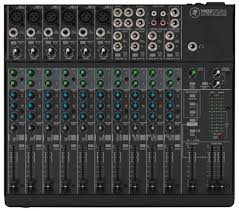
The sound board or audio mixer represents the hub in most audio mixing and mastering functions.  everything connects to the board.  Even the lighting system will use channels in the snake to connect from stage to console.  Things get plugged into and things get plugged out of the mixer as needed.  Today’s mixers are blue tooth USB WiFi fire-wired and light-piped together and will connect to an amazing array of devices.  So far we have focused on what gets plugged to the Inputs of the sound board.  There are a number of connection possibilities for the Outputs as well. We have already discussed some of them earlier, so this can be brief as you already know a lot of this in general.

On most sound boards you have a number of analog-out options.  In earlier discussions we talked about XLR and 1/4″ cables and connectors.  These will continue to be the main ones used for outputs.  On the front or face of most mixing boards you will see a stereo headphone out.  It will usually have its own volume knob and probably a selector to pick the options to Monitor including Stereo Out, Solo, Effects Sends, Effects Returns, Sub or Groups, Auxiliary Returns, and other options.  On the back or the top of the mixing board you will see the panel for Out-put connections in different sections.  There are some rules to determine what type of Audio Cable is used and whether it is a male end or female end and whether it has two connectors or three (or more).

In the early days of mixing boards, microphones and keyboards, it was important which brand you purchased.  If you wanted to get ‘that sound’ you had to have this mixing board channel strip or that particular keyboard.  Later on the computer industry similarly shot through their early days and you had the Macintosh or the Windows PC.  If you were brought up with one you could not be talked into the other.  Most modern equipment from PC’s to Automobiles can do everything.  They all have similar platforms and emulators.  There is style and quality as there always will be, but you can get software mixing programs and microphone/guitar emulator plugins that will make your audio tracks sound like anything you want —-THEY CAN EVEN MAKE YOU SOUND LIKE YOU ARE SINGING IN TUNE!!

So if you like Pepsi, no problem.  Want Coke?  Press this button……  More comfortable using a Mac?  Go for it.

All it takes is cash, a thorough understanding of what all the terms mean and a good idea where all the buttons are?!!?

Enjoy!

I have been very fortunate over the years in a number of ways.  As I look back on my history and the events I have been involved in, this rule became obvious to me.  I have always performed or created music with people that are much better than I am.  I did not do this by design, it just seemed to happen over and over.  One of my favorite bands I have been involved with for many years is Euphoria.  Think of all the adjectives you know to describe excellence and you can use them all for the members of the band.  They invited me to run sound for them and that is how I got the nerve to be a sound guy.  As they played out and I ran sound and helped with musical toys as a music store manager, we became great friends and shared a real passion for great music.  When the keyboard player decided to work on other projects, they found out I played keyboards and asked me if I wanted to take his place.  I cannot tell you how much courage it took to say yes.  I had never really played out before and we were into progressive rock and really complicated songs – many you heard clips from the studio demo posted earlier.

I knew I was not ready for prime time, but I got my keyboard gear together – practiced on my own every spare minute I had and forced myself to show up for practice.  I had big shoes to fill.  To their credit each of the band members were extremely patient!  The knew it would take me some time to get to their level.  Some songs on our set list were replaced with songs that had less emphasis on the keyboard until I could get my chops up to speed.  Some we had to drop altogether.  But they all worked with me and did not make me feel like I was slowing them down or not up to par.  Had it not been for their great attitude and flexibility, I may have thrown in the towel and called it quits before it got started.

The only better piece of advice in this area I think is just as important is to always play with great people!  Band life can be hard work, physically challenging and demanding and at the same time can be disastrous

I am famous for doing things the easy way and if I can, as cheap as possible.  Now that does not mean forget quality and versatility.  It means I won’t spend money on gadgets that I don’t need.  I try to run as clean a mix as possible, and making sure everyone gets heard.  If they are up there ‘playin it‘, I want the audience to hear it.  In reality, it doesn’t take a lot of gadgets to accomplish those two major things; make it sound good and loud enough for the venue, and put all instruments/vocals/strings/spoons or tambourines, I don’t care what it is….  in the mix.   As a band member, hiring sound guys and their rigs, a number of times after sound check and a few songs of the first set, my microphone was turned down so low, no one could hear me even in-between songs.  I could not get the sound man’s attention, or anyone else’s for that matter because no one could hear me (and as a keyboard player I was usually in the back corner of the stage in the shadows Ha!).  So eventually I just adjusted the microphone stand down toward the floor in front of me.  It is easy to hit the wrong button or turn the wrong knob; happens all the time.

Remember that the sound guy cannot hear what is really happening up on stage.  Sometimes you THINK you can.  But you as the sound engineer should be the first person to know what is going wrong when it does.  Keep an eye on all performers – they will look to you first.  As a performer and studio guy, I could tell when the guitar player broke a string, or if the drum head split and when or if the drummer had too much to drink on his birthday gig.  Things will go wrong but a lot of the time it is the sound guy.  You make an adjustment and grab the wrong knob.  They all look alike in the dark part of the venue or room.  The consequences can be anything from a non-event to a full blown crisis, depending on which knob you grab.  Obviously for the extreme crisis, you will know right away what happened and will probably be able to correct quickly.

It is the slow creepy ones that will get you.  Two songs later something changes on stage and chaos begins.

I suggested we set up the mixing board so the FX Returns are plugged into open channels so you can control their volume with the faders rather than the FX Return knobs.  I always turn the effects down in-between songs.  (you also get EQ and other benefits)  This makes it SOOO much easier to see in the dark clubs. I also use the sub-groups to assign drums, vocals, and other groups of mics their own fader that feeds directly to the Main Out or house out.  If there is a problem with one group, you can quickly test by adjusting that sub-group fader and see if problem goes away.  If not, return it to where it was and go to the next sub-group.  This way you do not have to go through fader after fader searching for a bad signal or feedback loop.   Once you narrow down the offending group, you will have a much better idea what the source is!

I would say most live performances the sound board is mixed to a Mono output.  In smaller rooms or clubs, I loved running in stereo.  I mixed for keyboard progressive bands a lot and the stereo keyboards and samplers consumed the rooms when mixed right.  Not in volume——– The vocals (sometimes three sometimes five in the band) panned as well.  Overkill in a way, but not much work and easy to arrange with equipment versatility.  Most boards have stereo FX that can add lot to the imaging.  But again, that is not the norm.  So you can either set board up in stereo and have the Main Output plugged into the MONO OUT to your system, or you can mix to mono and use one Main fader or the other.  That’s about it.  We have covered the entire mixing board, in its basic format.  Headphone outs, Tape or other inputs, on-board effects, Solo or Audition functions as well as digital features make new sections.

As we continue down the signal path, we get to a new section.  This is separated from the EQ section and generally uses a different color coding for the associated knobs.  The next group is the Aux Sends.  Each send represents an output jack that will go to external audio sources. One example would be the stage monitor mix(s).  If you have two monitors on each end of the stage serving performers, you can use Aux Send 1 going to the left monitor and use Aux Send 2 going to the right monitor.  If performer 1 wants to hear themselves and a little bit of performer 2 in the same monitor, simply send a lot of performer 1’s channel to Aux Send 1 and a little of the performer 2 to the Aux Send 1.  If performer 2 does not want to hear performer 1 in their respective monitor, simply turn up performer 2’s channel Aux Send 2 up a bunch and do not turn up Aux Send 2 on the channel for performer 1.  That was probably harder to say correctly than actually doing it.

Three

You can use Auxiliary Sends to route a signal from any channel to external effects boxes like Digital Delays, Reverbs, and even recording devices in a pinch.  You can use it to trigger light boards that have an Audio Input mode.

These Auxiliary Sends can sometimes be switched from Pre to Post.  Some are fixed either way.  This can also get confusing but if the channel Aux Send is in Pre mode it means Pre-Fader.   The volume faders on each channel will affect the level of the signal that is sent to the House or the Main Out of the mixer and when selected, to the headphone out.  It is a good idea to solo instruments in the headphones to pick or change microphone locations and isolate room noise and other performers.  If the Aux is set to Pre-Fader, it means that the Aux Send levels will be determined before the channel fader has any effect.  Turn the channel volume fader all the way down and you will still have plenty of signal going to the Aux Send.   If the Aux Send is in Post Fader mode, the amount of signal sent to the Aux Send for that channel will be directly affected by the level of the channel volume fader.  Fader off = no Aux Send level.  The number of sends will vary widely.  In this case, more is better!

At this point the example starts a new section.  This will affect the Main Out section.  This is where we can set the stereo Pan position, Mute or un-Mute the channel, and Solo the instrument for gain staging and troubleshooting during a performance.  When running in stereo, general rule is very low frequencies get panned to center.  After that, adjust to performance and venue.  Sometimes the stage sound is very loud, and listeners close to the stage will only be able to hear that performer.  Sometimes the shape of the stage or design of venue will require creative solutions using stereo panning.

This strip includes a pair of colored LED’s for signal strength and Peak warning level indicators.  Occasional red for short periods of time are OK, but better to avoid as long as you have a strong signal otherwise.  After we have set the various knobs correctly and have good signal strength, we can use the channel volume fader to set the level of that channel in the House mix.   Channel Mutes can have different affects.  Some boards Muting a channel will stop that audio source from all outs, and some might allow Aux Send 1 & 2 for monitors.  See manuals for lots of details I cannot cover in these articles.

Other examples below with different lay-outs;

TwoOne

But here is the good news;  we have just learned 75% of the face of the mixing board.  Each channel duplicates what we just went over.  All those knobs are now grouped logically, easily identified explained and we understand what each one is for.  Here on in it is repetition for gain staging and sound check.  Use Pad and 1st Gain Stage to adjust signal strength, add or subtract frequencies using the channel EQ, set amount of Aux Send to monitors and effects and set the stereo field positions as we watch level indicators and set channel volume fader.  Repeat.  Finished!

Next we can go over the benefits of Group Sends and the other 20%